
Tender Scope Walkthrough / worked example
Follow one tender. See how the work takes shape.

Bidroom in a Box®
This walkthrough shows how a tender pack can be converted into a structured, review-ready scope output. It follows one fictional tender through the five Bidroom in a Box® stages, from intake to the pre-submission QA gate, and every stage opens the document it produced.
Follow the WorkOpen the deliverablesWorked exampleThese documents use fictional projects and figures. Open the originals to inspect their source context.
- Working stages
- 05
- Deliverables
- 05
01 / follow the working record
Five stages, one tender.
Follow the intake, requirements, clarifications, pricing and pre-submission checks. Open the working record at each stage.
Setting
B99 Malthouse Block, a fictional boiler-house replacement
Read each document in your browser. Where a PDF exists, it is linked beside it.
See the deliverablesFront Desk™
Tender Intake Form
What this stage shows: Front Desk™, Tender Intake Form
The intake record for the whole bid: a tender clock (received, due, working days, internal QA target), the project and contract capture, an inventory of what actually arrived in the tender pack and what is missing from it, site constraints, the bid / no-bid score, and the named bid team with a conflict check.
Why it mattersTriage is recorded before an hour is spent on the bid, so the deadline, the scope category, the decision to bid and the owner of each are all in one place from day one.
Roll Call™
Requirements Traceability Matrix
What this stage shows: Roll Call™, Requirements Traceability Matrix
Every requirement lifted out of the tender pack and logged: 78 lines across seven source documents, each mapped to its clause, category and owner, to the place in the pack that answers it, and to a status. The gaps are routed onward as clarifications rather than closed with a guess.
Why it mattersClear scope structure helps estimators, commercial reviewers and delivery teams understand what is included before pricing and submission.
Question Time™
Clarifications & RFI Register
What this stage shows: Question Time™, Clarifications & RFI Register
The clarification register: 19 RFIs plotted across the bid window, each with the question raised, the response received, the impact and the resolution action. The three that never got an answer are carried as stated commercial assumptions in the tender letter rather than left silent.
Why it mattersAssumptions give the client and commercial team a clear basis for review before submission.
Cost Stack™
Pricing Build-Up
What this stage shows: Cost Stack™, Pricing Build-Up
The estimator's working, marked internal in the example rather than client-facing: the tender total broken into its eight cost layers, a layer-by-layer build-up, the layer mix behind each BoQ section, sample build-ups behind individual rates, and the risk-pot strategy, including what the risk pot deliberately does not cover.
Why it mattersClear exclusions help avoid scope creep, pricing assumptions and later commercial disputes.
Last Look™
Pre-Submission QA
What this stage shows: Last Look™, Pre-Submission QA
The gate before the pack leaves the building: 62 checks across nine categories, a cross-pack reconciliation of every figure that appears in more than one deliverable, six recorded sign-offs and the submission package list. The final structure gives the bid team a clearer basis for pricing, clarification and submission review.
Why it mattersBidroom in a Box® is designed to increase tender capacity while improving control, structure and traceability.
02 / inspect the output
What the five stages produced.
The client-facing set from the sample tender. The Last Look™ document shows how figures repeated across documents are checked before submission.
Inside the example
Client Summary
A complete first-page preview. Open the original to inspect all 3 pages at full size.
Inspect Original: Client Summary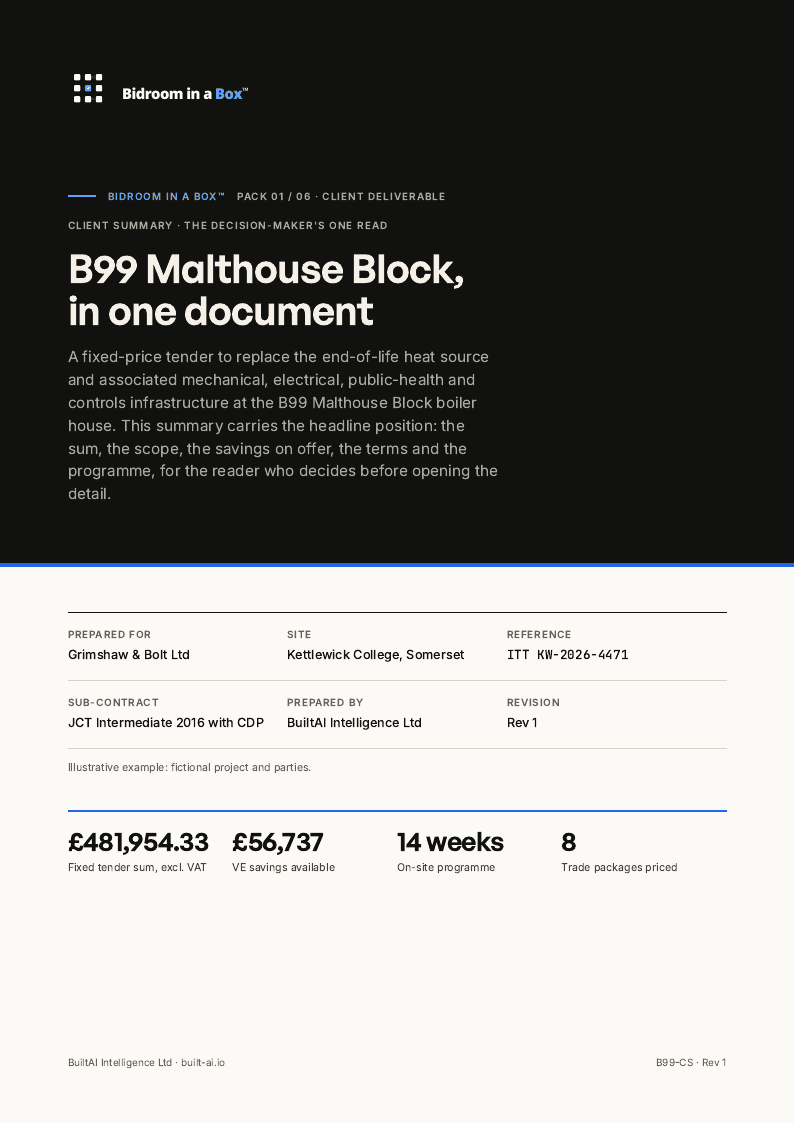
- CSClient SummaryPDF of Client Summary
- TLPTender Letter ProposalPDF of Tender Letter Proposal
- PDPProject Delivery PlanPDF of Project Delivery Plan
- BoQPriced Bill of QuantitiesPDF of Priced Bill of Quantities
- PRGProgramme Rev 1PDF of Programme Rev 1
About these examplesThe project, client and figures are invented for this example. These are sample documents, not a client record.
Before anything is issuedFinal review, validation, approval and reliance remain with the client's competent people.
Put BuiltAI to work
What could this make room for?
Bring a real piece of work. Explore what a structured workflow could give back to your team.
All worked examples