


The Plant Room

BuiltAI · standalone product · workspace

The Plant Room – one workspace for BuiltAI workflow packs

The Plant Room is where BuiltAI workflow packs run together: BidRoom in a Box, The Pre-Con Pack, RAMS Factory, Commercial Control Kit, Margin Cockpit and The Dispatch Desk. Teams review draft deliverables, follow stage progress and record named approvals before issue. Access is included in pack licence arrangements. 104 Skills in the catalogue. The workspace shown uses fictional data.

Inspect the Saved Workspace
Workflow packs
6
Skills
104
Approval
Named

A responsible person records the decision before anything is issued.

The Plant RoomGuided tour

See the work. Inspect the output. Keep the decision.

Explore the saved sample workspace, then inspect a published tender example and its human review responsibilities.

Sample workspace and documents, with fictional project and parties. These views do not run a workflow, approve work or show customer results.

01 / Workspace

Know what needs your attention.

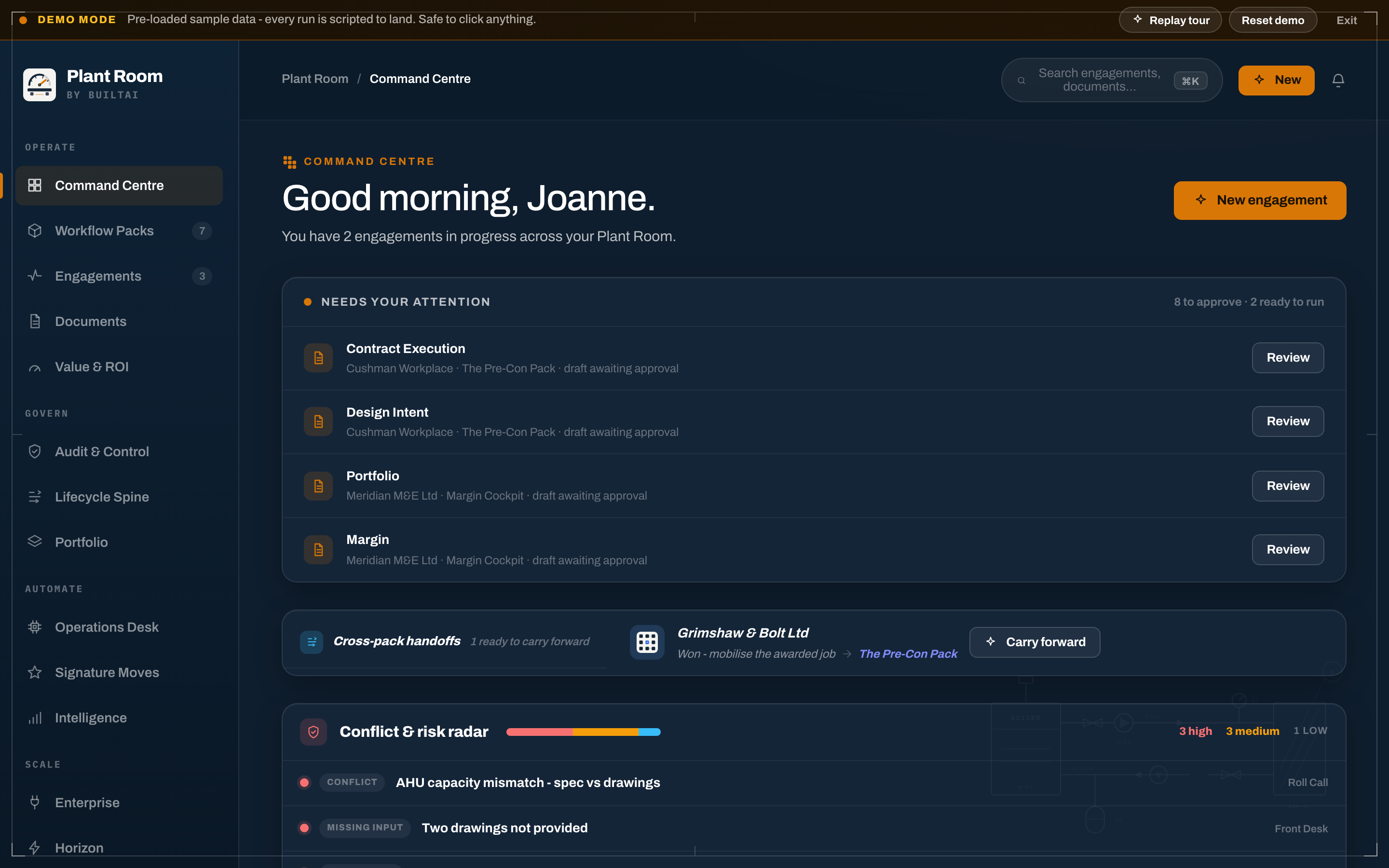
The saved command-centre view brings draft work, review queues and cross-pack handovers into one place. Your team can see what needs a check before the next step.

Pre-loaded demo data. The image is a saved view, not a live connection to a client's workspace.

Open the existing sample Portal (new tab)
The Plant RoomSaved example
Saved Plant Room sample command centre, with its demo-mode warning, drafts awaiting review and a cross-pack handover visible.
Saved sample command centre. The original demo-mode warning remains in the image.

02 / Prepared output

Inspect the document, not just its status.

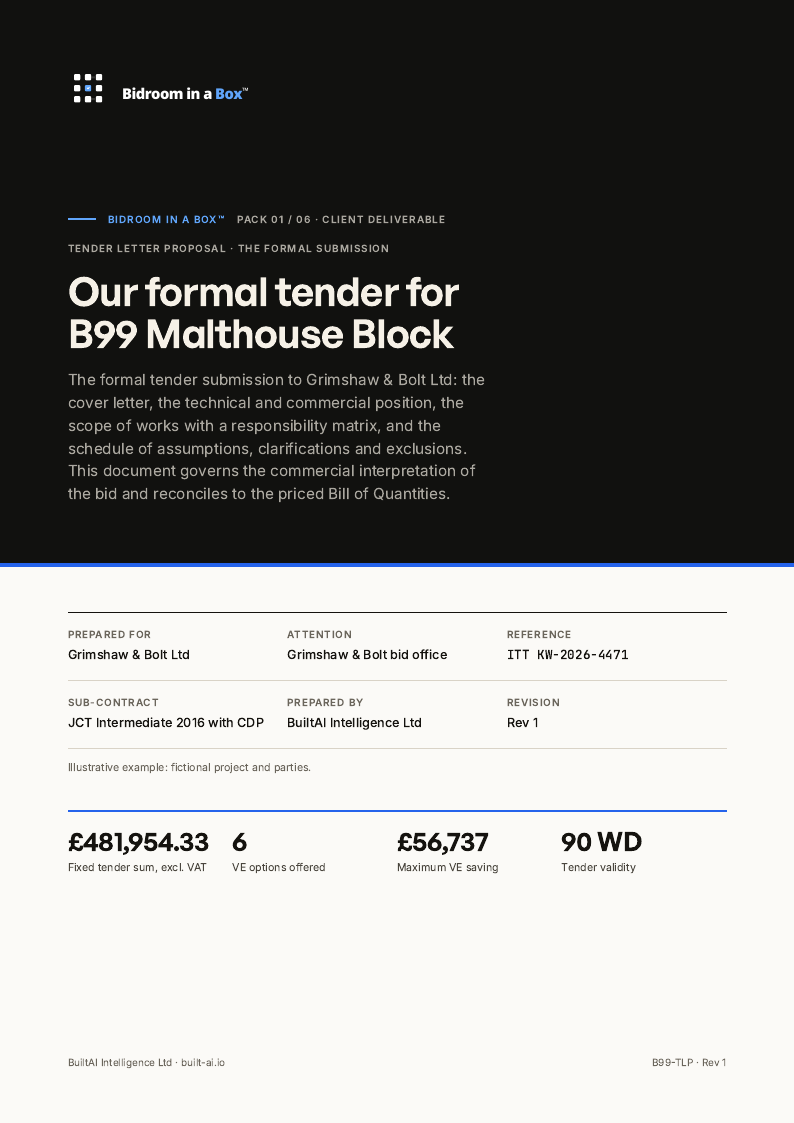
Open the tender letter to inspect the scope, responsibilities and commercial clarifications. The liquidated-damages rate remains to be agreed: the sample carries a working assumption, not a resolved fact.

B99-TLP · Rev 1. Published fictional Bidroom in a Box document; the preview is its first page, not a new output created by this tour.

Read the complete tender letter (new tab)
The Plant RoomSaved example
First page of the published B99 Malthouse Block sample tender letter and proposal, revision 1.
Tender letter and proposal · B99 Malthouse Block · fictional project and parties.

03 / Human review

Keep the decision with your people.

The Last Look example assigns distinct checks to named roles before issue. A prepared document still needs technical, commercial and submission review.

B99-LL-05. Three of the six roles in the published fictional record. Choosing this view does not record an approval or send anything.

Inspect the complete Last Look example (new tab)
The Plant RoomSource excerpt

Review responsibilities

Technical Lead
Scope and the contractor's design portion
Commercial Manager
Pricing, markup suppression and terms
Bid PM
Submission authorisation ahead of the deadline
Selected responsibilities from the Last Look sample document. This is a source excerpt, not a functioning approval panel.

02 / Skills to outputs

Every pack, its stages and the documents that come back.

Open a pack to follow the stages, see the documents that come back and open the original examples. Six packs run inside the workspace; the Audit's delivery is agreed per client and Built to Order runs in your own Claude.

The linked documents use fictional projects and figures. Your team reviews any live output before issue.

Bidroom in a Box5 stages · 5 documents
The Pre-Con Pack5 stages · 8 documents
RAMS Factory4 worked examples · 8 documents
Commercial Control Kit6 stages · 8 documents
Margin Cockpit5 stages · 8 documents
The Dispatch Desk6 stages · 8 documents
Built to Order4 stages · 6 documents · Runs in your own Claude
Operational Intelligence Audit7 documents · Delivery agreed per client

Four-week diagnostic, signed-off.

How it is delivered

The audit is itself the single-pass deliverable bundle – one 4-week engagement, seven artefacts handed over together.

03 / One workspace

Drafts by BuiltAI. Decisions by your people.

A common operating surface helps teams see what is being prepared, what needs review and what is ready for the next step.

  • Standby
  • Live
  • Holding
  • Cleared
  1. Workspace

    A controlled workspace for the workflows your team runs

    Bidroom, Pre-Con, RAMS, Commercial Control, Cockpit and Dispatch share one navigation, access model and audit view.

  2. Outputs

    Structured deliverables, ready for review and export

    Open draft deliverables in the workspace, review them with your team and export a PDF for the project record.

  3. Live state

    A shared view of progress across the suite

    Standby, Live, Holding and Cleared give the team the same status language across tenders, RAMS, variations and service work.

  4. Audit

    A traceable record of the work and its decisions

    Bring named saves, reviews, changes and dates into a searchable, filterable record that supports human review before issue.

04 / Activity and decisions

Follow the work. See the decisions.

Review who saved or reviewed an output, what changed and when, with a searchable, filterable audit trail. The activity shown here is a fictional example.

  • 6 Workflow Packs
  • 104 Skills in the Catalogue
  • Human Review before Issue
Workspace activitySaved view
  • James W. issued B99 tender pack (5 deliverables)

    Issued
  • Sarah O. opened H12 Cost Stack for revision

    Opened
  • Mike H. closed B99 Variation #482 at £12,400 · Agreed

    Closed
  • BuiltAI ran B99 Last Look QA · 14 checks passed

    QA
  • Ben C. shared M07 RAMS Q&A answer with three reviewers

    Shared

Questions

Before we talk.

Questions teams ask about The Plant Room.

What is The Plant Room?

The Plant Room is BuiltAI's authenticated workspace for running licensed workflow packs, reviewing structured outputs and recording named approvals with an audit trail.

How many Skills does The Plant Room include?

104 Skills in the catalogue.

How is The Plant Room different from The Dealroom?

The Plant Room is the client workspace for BuiltAI workflow outputs and approvals. The Dealroom is a separate buy-side acquisition workspace, connecting opportunities, assessment and evidence.

Does The Plant Room auto-issue documents?

No. Drafts are prepared for review. A responsible person records the decision before anything is issued.

See it in context

Explore how your workflows could run in the Plant Room.

Ask us to walk you through a demo workspace and discuss the workflows your team wants to improve.